ADR-513: Themes reach every surface, with gradients, glyphs and painted report bands¶
Summary¶
- Decided: A theme file may set a ground gradient across the whole frame, the border, the rule, mark and presence glyphs, and an ornament before pane titles. Each key is optional; a key left out keeps the surface's own default, so every existing theme and dotfiles palette draws as it does now. The gradient is painted only at truecolor depth, and every text role must meet its contrast floor on every colour the gradient paints. The glyphs and the ornament draw at every colour depth; below 256 colours they take the default theme's colours. Three bundled themes use the keys: Miami, Tampa and Miami Nights. Every surface that shows content follows the active theme, plain reports included: on a terminal, a report under a theme that paints its own ground prints as a band of that ground, with the theme's rule and presence glyphs. A theme may also replace each event glyph of the session timeline and the introspect screens, and the three Florida themes replace six of them. A theme may carry its own waypoints, the markers that tie a way in the way table to its place on the context strip, and
theme.waypointschooses between the theme's set and the default one. This extends ADR-504 §4 and §5 and completes §9's move of the plain outputs. - Trades away: A theme file that only sets colours. Decoration is part of the theme a user chooses, so a user who likes Tampa's colours and not its waves edits a copy; no setting overrides a theme's decoration yet. A theme file with the new keys fails to load in a build older than this change. Status colours on a gradient theme may be lifted further from the values written in the file than on a flat ground. Plain reports printed to a terminal change under every chosen theme, including ones without the new keys.
- One-way? No. Reversible now; expensive once user themes carry the keys, because removing a key makes those files fail to parse.
- Probes: Confident (looks unchanged): you want a theme without the new keys, bundled or your own, to look exactly as it does today on every surface. Not confident (lower depths): on a 256-colour terminal a gradient theme shows its flat THEME_BG and keeps its borders, marks and ornament; on a 16-colour terminal, or under NO_COLOR, the plain default theme is used in its place, so Tampa's waves and lightning bolt disappear along with its colours.
- Inversion: Between decoration as part of a theme's identity, one file and one choice, and decoration as a user preference set apart from the palette, as the status-line segment shape is. This record takes the first end and leaves room for the second as an override.
Edited 2026-10-28: the operator asked that the markers tying a fire in the table to the context strip be named and carried by themes (item 15). The Decided line gained the waypoints sentence; nothing in it was removed.
Context¶
ADR-504 §4 fixed the theme file at the dotfiles palette's keys plus agent-ways' own: ten colour slots, the background mode, and four optional pinned roles. A theme changes colour and nothing else. Every border, rule, selected-row mark and presence dot is a glyph the surface picks, and the surfaces do not agree: agent-tui panes use the plain border and attend-chat's use the rounded one.
Three bundled themes were drawn to carry a place, Miami, Tampa and Miami Nights, and each needs a ground that changes across the frame and glyphs of its own.
A gradient changes the ground every text role is read against. ADR-504 §4 lifts each text role to its contrast floor against two grounds, bg and the selection. On a gradient those two no longer cover what is under the text.
The chosen theme reaches the screens only. The plain outputs moved onto agent-theme under ADR-504 §9, but no binary installs the chosen theme as the process painter, so ways status, agent-fmt's tables and ways-audit print in the default theme's colours whatever is active. Printing a light theme's text colours on a dark terminal's own background would leave them below their contrast floors.
Decision¶
- Optional keys. Each key below is optional. A theme that leaves one out gets the surface's own default for it, so a theme with none of them draws exactly as before. The keys follow ADR-504 §4's style: bare uppercase
THEME_*names with double-quoted values.
Edited 2026-10-28: item 15 adds the format's first table. A theme file is now TOML with top-level
THEME_*keys in the style above, then optional tables. A file that uses a table no longer sources as a shell script; a palette with no table still does, as a dotfiles palette does.
THEME_GRADIENT. The value is a direction,verticalorhorizontal, then two to four#rrggbbstops separated by spaces, for exampleTHEME_GRADIENT="vertical #d4efff #fff4ee #ffe6ee".- The stops are spaced evenly from the frame's first row to its last (vertical) or its first column to its last (horizontal), and a cell's ground is the colour interpolated in OKLab at its row or column.
- A cell with a ground of its own, such as the selection, a lozenge or a button, keeps it. Every other cell shows the gradient at its position. Dialogs and popups have no flat ground of their own, so the gradient shows behind them.
- The gradient requires
THEME_BACKGROUND="fill"; a gradient withterminalis a parse error. - It is painted only at truecolor depth. At 256 colours the frame is filled with
THEME_BG, which stays required. Below 256 colours item 9 applies. -
The ANSI output for plain commands paints no gradient.
-
Contrast on a gradient. The grounds the derivation lifts against are bg, the selection, each gradient stop, and the points that cut each segment between neighbouring stops into 64 equal intervals. Each text role is lifted to 4.5:1 and each muted role to 3:1 against bg and the selection, and to those floors plus 0.05 against the gradient's points, by the method of ADR-504 §4. The theme editor's contrast results cover the same grounds and name the ground a failing role fails on.
Amended 2026-10-28, from the branch's code review. The item first sampled seven points between neighbouring stops. WCAG luminance is not monotonic along an OKLab segment, so a role could pass every sample and fall below its floor at a cell between two. Sixty-four samples a segment with the 0.05 margin hold the floors at every rendered cell.
-
The border.
THEME_BORDERnames a set:plain,rounded,doubleorthick.THEME_BORDER_GLYPHSgives eight glyphs in this order: top-left, top-right, bottom-left and bottom-right corners, then the top, bottom, left and right edges. Tampa's╭╮╰╯~·││draws a rounded box with waves along the top and a dotted bottom. Setting both keys is a parse error. The theme's border is the one every pane and dialog draws; a dialog that names a border of its own (ADR-504, note of 2026-10-13) keeps it. -
Rule, mark and presence glyphs.
THEME_RULE_GLYPHSis two glyphs, the rule and the selected rule. The default is─━.THEME_MARKis the selected-row mark. The default is▌.-
THEME_PRESENCEis two glyphs, live and idle. The default is●○. -
The ornament.
THEME_ORNAMENTis one grapheme of display width 1 or 2, an emoji included. It is drawn before each pane title, followed by one space. When a title is cut to fit, the ornament is dropped before any of the title's text. -
Glyph checks. Every glyph except the ornament is one grapheme cluster (UAX #29) of display width 1, measured by the width rule ratatui uses: unicode-width's width, and one cell more for each halfwidth katakana sound mark, U+FF9E and U+FF9F. A glyph that holds a control character, U+2028 or U+2029, the ornament included, a glyph of any other width, a glyph that is more than one grapheme, or a key with the wrong count of glyphs is a parse error naming its line.
Amended 2026-10-28, from the branch's code review. unicode-width counts many control characters one column wide, so an escape or a newline passed as a glyph and reached the terminal. The parser had also measured with unicode-width alone, where ratatui draws
ガtwo cells wide.
-
Writing back.
to_textwrites every decoration key the theme carries, after the pinned roles, so a theme saved from the theme editor keeps its decoration. Editing the decoration in the theme editor is outside this decision. -
Decoration at every colour depth. Below 256 colours, on a 16-colour terminal or under
NO_COLOR, the default theme's colours are used in place of the chosen theme's, as ADR-504's note of 2026-10-01 says, and the chosen theme's border, rule, mark and presence glyphs and its ornament keep drawing. That note put the whole default theme in place of the chosen one; for decoration this record narrows it to colours. -
Bundled themes. ADR-504 §5's bundled set gains three themes original to agent-ways, each with
THEME_BACKGROUND="fill". The figure below shows each as a pane, drawn from the files with the slot colours as written, before lifting. - Miami (light): a vertical gradient from a pale Hiroshi Nagai sky to South Beach blush stucco, flamingo accent, pool-turquoise info, double borders,
🦩. - Tampa (light): a horizontal gradient from the bay at the left (
#e8f3fb) through a warm cream (#fff6e8) to the sunset at the right (#ffe4d2); Lightning blue accent (#0057b8), Ybor tile teal info (#00818a), creamsicle orange warn (#e35200), Buccaneers red err (#c8102e), Gasparilla purple alt (#6c2c91), Skyway-cable gold subtle (#f5d98a), and a pinned pale-blue selection (#d8e8f8); the wave-topped rounded border╭╮╰╯~·││,⚡. - Miami Nights (dark, retro-future): a vertical violet-to-magenta horizon gradient, neon pink, cyan and mint, thick borders,
🌴.
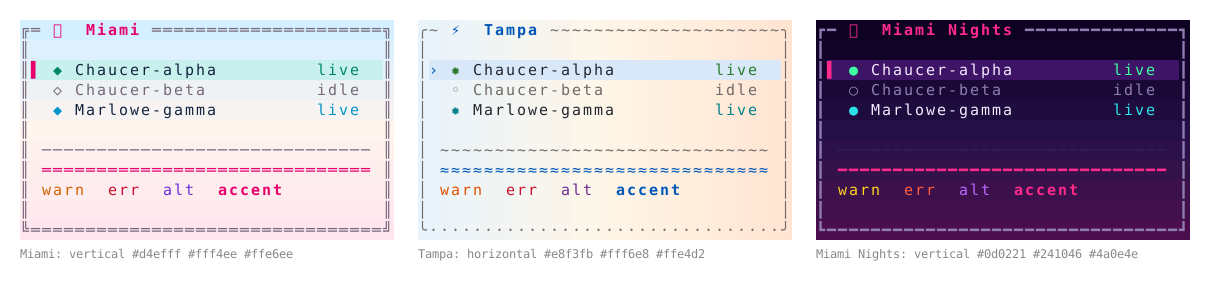
- Every surface follows the active theme. The settings screens, the session viewer (
ways session live) and the session screens, a way opened to read, attend-chat, and every plain report draw from the theme named bytheme.active. Each binary that prints plain output installs that theme as the process painter (agent_theme::install) at the start ofmain, when stdout is a terminal. It readstheme.activeonly then, so piped output and the hook commands of ADR-504 §11 read no theme file. Forced colour on a pipe (FORCE_COLOR,CLICOLOR_FORCE) keeps the default painter: its colours, no theme file read, no band.ways manageprints through its own painter, the terminal palette, and does not follow the theme.
Amended 2026-10-28, from the branch's code review. The item first installed the theme wherever output was styled, which forced colour made true on a pipe, so a hook command under
FORCE_COLORread the theme and banded output bound for the model's context. The review also recorded thatways managestays on its own painter.
- Report blocks. Under a theme with
THEME_BACKGROUND="fill", a plain report goes through anagent-themeblock()that paints the theme's ground behind every line out to the terminal's width. - A vertical gradient spans the block's lines, top to bottom, and a horizontal one spans the terminal's width, left to right.
- The depth rules are the screens' rules: the gradient at truecolor, the flat
THEME_BGat 256 colours, and below 256 the default theme's colours, which paint no ground. - A theme with
THEME_BACKGROUND="terminal"paints no ground, and its colours print on the terminal's own background. -
Unstyled output, such as a pipe or a file, is unchanged.
-
Report glyphs. A report's table rules use the theme's rule glyph, and its live and idle markers use the theme's presence glyphs, at every colour depth where output is styled. Borders and the ornament stay on the screens. Unstyled output keeps the default glyphs.
-
Event glyphs. Each glyph the session timeline and the introspect screens use to mark an event is an optional theme key, one glyph of display width 1 under item 7's checks. Its default is the glyph drawn today, held in
agent-theme, so a theme without the key draws as before. THEME_EVENT_HEAD●,THEME_EVENT_MARK┼,THEME_EVENT_MATCHED◆,THEME_EVENT_INJECTED◇,THEME_EVENT_SUPPRESSED⊝,THEME_EVENT_REDISCLOSED↩.THEME_EVENT_WOULD_BLOCK◌,THEME_EVENT_BLOCKED⊘,THEME_EVENT_REFIRE_HELD◷,THEME_EVENT_CAP_HELD⊟.THEME_EVENT_DUEtakes two glyphs, due and not due,●○.- Each event has its own key, so a theme names the events it changes and leaves the rest at their defaults.
-
The three Florida themes set the six keys of the first line and leave the warning glyphs (would-block, blocked, the two held, due) at their defaults, so a warning reads the same under every theme. Head, mark, matched, injected, suppressed and re-disclosed are Miami's
☀ ┊ ✿ ❀ ☂ ↻, Tampa's↯ ┊ ⚔ ✦ ☈ ⟲, and Miami Nights'◓ ┊ ✦ ✧ ☾ ↻. -
Waypoints.
Added 2026-10-28, on the operator's request that the theme selector name these glyphs, that a theme may carry its own and that the definition carry its colours. The operator's later "maybe they don't need to follow the background color, but probably the foreground color should be definable" removed the background from an entry.
The per-way markers in the way table's ◎ column and on the context strip, called pins in the code until now, are waypoints. A waypoint marks a point on a route, and the context strip is the route through the context window.
- A theme file may carry an optional [[waypoints]] array of tables, 1 to 16 entries, each { glyph = "…", fg = "#rrggbb" } with fg optional. Clusters take the entries in order, cycling when there are more clusters than entries.
- A glyph is one grapheme of display width 1 or 2, measured and refused for control characters as item 7 has it. A glyph two wide is allowed only where every code point has Emoji_Presentation=Yes in Unicode's emoji-data.txt, with no variation selector and no zero-width joiner, so the terminal agrees on its width. Anything else is a parse error naming its line.
> Amended 2026-10-28, from the branch's code review. The parser had read Emoji_Presentation from whole Unicode blocks, which took 🈂 and 🈷, both Emoji_Presentation=No and drawn one cell wide by some terminals. It now reads the property itself, from Unicode 17.0's table.
- An
fgmust reach 3:1 against every ground of item 3, WCAG 1.4.11's floor for graphical objects. The derivation lifts anfgthat falls short, as it lifts a muted role. An entry withoutfgtakes the categorical colour of its position, as a pin does today. A colour emoji draws in its own colours and ignoresfg. - The table column and the context strip take the display width of the set's widest glyph.
- The setting
theme.waypoints, besidetheme.activein ways' settings and offered in the theme tab, isthemeordefault, and defaults totheme. Underthemethe active theme's set is used where it has one. Underdefault, and for a theme without a set, the waypoints are today's ten glyphs●◆■▲◉▶★◈♦▪in agent-identity's categorical colours. - Below 256 colours the glyphs draw and the colours drop, as item 9 has it for decoration. Piped output keeps the default set.
to_textwrites the[[waypoints]]table back after the keys, so the theme editor keeps it on save (item 8).- The three Florida themes carry sets of ten emoji. Miami Nights, after Miami Vice: 🌴 🦩 🚤 🐊 🌆 🎷 📼 🎹 🌃 🍸. Tampa: ⚡ ⚓ 🦜 🐓 🏈 🏒 ⚾ 🌉 🌇 🐢. Miami: 🦩 🌺 🐬 🍹 🌴 🏄 🐚 🍊 🌞 🥥.
- A theme's waypoint colours replace the categorical palette for its waypoints, which narrows ADR-504 §6, where categorical colours stay outside themes.
Consequences¶
Positive¶
- A theme can carry a place or a mood in its ground and glyphs, and the bundled set shows three.
- Every existing theme, bundled or user-owned, and every dotfiles palette loads and draws its screens unchanged. That holds for the screens only: plain reports follow item 11 under every theme, and under Paper, which paints its own ground, a report prints as a band of it.
- Readability on a gradient is held by the same derivation as on a flat ground, so a user theme with a gradient cannot leave text below its floor.
- A bad glyph is refused when the file is read, so a frame never misaligns from a theme.
- A report reads in a light theme on a dark terminal, because its text sits on the ground the theme was tuned for.
- One theme choice reaches the screens and the plain reports alike.
- The way table and the context strip can carry a theme's character in their markers, and
theme.waypointsreturns them to the familiar set without changing theme.
Negative¶
- A build older than this change refuses a theme file with the new keys as an unknown key. A user theme shared between machines on different versions loads on one and fails on the other.
- Status colours on a gradient are lifted against more grounds, so they can sit further from the colours the file names. A stop far from the text roles in lightness makes this worse.
agent-thememeasures grapheme clusters and display width, which adds Unicode segmentation and width to a crate with no ratatui dependency.- Glyphs of ambiguous East Asian width, such as Miami's
◆◇and Tampa's≈, measure width 1 and pass; a terminal set to treat ambiguous characters as wide draws them two cells across and misaligns the frame. - Several of the Florida event glyphs, such as
☀,☂and⚔, have text presentation by default but render as colour emoji in some fonts, where they lose the role colour and can take two cells. - An emoji ornament depends on the terminal's font. A terminal that draws a two-cell emoji in one cell, or with no colour glyph, shifts or blanks the title.
- Golden frames for surfaces drawn under a decorated theme need recording, and the theme editor's contrast view grows a row per ground.
- A plain report on a terminal now changes with the active theme, including under bundled themes that predate this record, such as Paper. Report tests that compare styled output pin the painter.
- A report under a vertical gradient is painted only once its line count is known, so the block holds its lines until the report ends. A report under a horizontal gradient or a flat ground can print line by line.
- A report painted to the terminal's width leaves a band that a terminal resized later does not repaint.
- Each binary with plain output reads the settings and the theme directory once when its output is styled, which adds that read to the start of an interactive command.
- Colour emoji waypoints ignore
fgand depend on the terminal's font; a font without colour emoji draws them as outlines or blanks, and two waypoints can then be told apart by shape only. - A set with a two-cell glyph doubles the width of each marker, which halves the context strip's resolution at a given terminal width.
- A theme file with a
[[waypoints]]table no longer sources as a shell script, so a tool that sources dotfiles palettes cannot read it.
Neutral¶
- A surface reads the chosen theme's decoration at every depth, including where its colours are unused, so below 256 colours a frame takes its glyphs and its colours from two themes.
- The new keys are agent-ways' own in the dotfiles style. ADR-504's warning stands: a later dotfiles key of the same name would collide.
- A named glyph set that themes refer to, shared between themes, can be added later in the same way as a user decoration setting; the event keys and the
[[waypoints]]table stay as they are. - A user decoration setting that overrides the theme's, as
theme.shapedoes for the lozenge caps (ADR-504, note of 2026-10-01), can be added later without changing these keys.
Alternatives Considered¶
- Decoration as a user setting apart from the palette, as the segment shape is. It lets a user pair any palette with any borders. A theme could then not carry a place in one choice, and the bundled themes would ship as palettes with advice. Deferred: an override setting can come later and leave the theme keys as they are.
- A saturated Nagai-blue sky stop in Miami. Lifting every status colour to 4.5:1 across it darkened them all to dull values. Miami's sky stop is pale instead.
- Interpolating in sRGB. A straight line in sRGB between two hues passes through muddier, darker midpoints, and agent-theme already measures and lifts in OKLab and OKLCH.
- Quantizing the gradient to 256 colours. Neighbouring rows would snap to the same palette entry and band, and the contrast checks would run against colours the theme never named. The flat
THEME_BGis a ground the derivation already handles. - Reports take the theme's text colours on the terminal's own background ("Colours only", declined by the operator). A light theme's colours would print on a dark terminal below their contrast floors, and the reverse on a light one.
- Only themes on the terminal's background apply to reports ("Terminal themes only", declined by the operator). Reports would ignore every theme that paints its own ground, the three in this record among them.
- One positional string for every event glyph, as
THEME_BORDER_GLYPHSis for the border. A position names no event, a theme must restate every default to change one glyph, and adding an event later shifts or extends every theme's string. One key per event names its event and lets a theme change a subset. - A registry of named glyph sets that themes refer to. Deferred, like the user decoration setting: the Florida themes are the only ones that change event glyphs, and a registry can sit over the keys later.
- Free-width glyphs, measured at draw time. A two-cell border glyph breaks every box it sits in, and catching it at draw time means each surface handles a bad theme. One check when the file is read covers every surface.
- "Way charms" or "way references" for the markers (added 2026-10-28). Both were among the operator's candidates. "Charms" reads as ornament, where the markers carry meaning, and "references" collides with the See Also edges between ways. "Waypoints" names a point on a route, and the context strip is that route.
- A background chip behind each waypoint,
{glyph, fg, bg}(added 2026-10-28). Dropped on the operator's word: "maybe they don't need to follow the background color, but probably the foreground color should be definable". A waypoint sits on the theme's ground, and itsfgis checked against every ground. - A theme's waypoints with no setting to turn them off (added 2026-10-28). The operator asked for a choice between the default set and the theme's, and the default set is the one a user already reads.