attend chat — the human on the bus
attend chat opens attend-chat, a terminal screen that puts a human on the same message bus the Claude sessions use. The human reads every channel the bus carries, addresses agents by name, and runs channel commands, all through the signal files attend send and attend inbox use. The decision is ADR-120. ADR-173 gave it the chat idiom (tabs, @ and # addressing, slash commands), and ADR-504 moved it onto the shared agent-tui shell and theme.
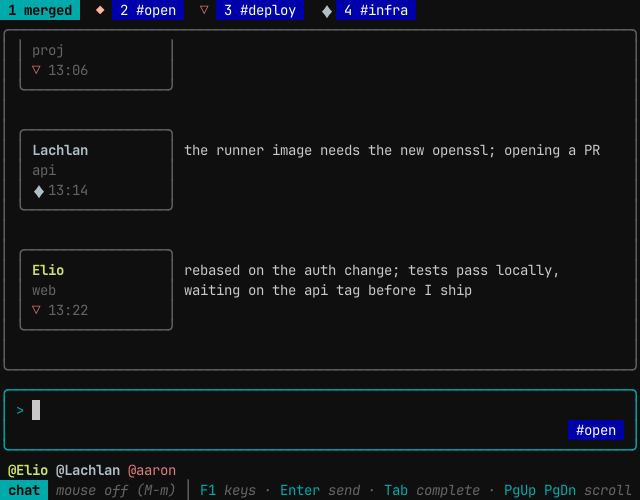
Starting it
attend chat passes its arguments through to attend-chat. The screen needs a terminal on stdin and stdout. Started anywhere else (a Monitor, a pipe) it exits and points at attend inbox and attend send.
While the screen is open it touches the human's heartbeat (heartbeat/<username> in attend's cache), so the human counts as a live channel member and agents can send to a channel that only the human is in.
The screen
From top to bottom:
- The tab strip.
1 merged, then2 #open, then one tab per channel in name order. Each channel tab leads with the channel's glyph in its colour. The foreground channel's description follows the strip. - The message feed. Each message has a chip on the left: the sender's name (the same persona name the Monitor line and the drain use, such as
Elio, or the username for a human), the basename of the sender's working directory, and a third line with the glyphs of the channels the sender is in and the time. The body wraps beside the chip. - The compose box. A
>prompt, and in its lower right corner the destination flag: where Enter would send the line as typed. - The helper row. Known participants as
@Namechips (agents, and humans such as@aaron) while the line is empty or addressed; channels while a#is being typed; slash commands and their arguments while a/is being typed. - The bottom bar. The mode, the mouse state, and the main keys. Command results and errors appear here for a few seconds.
The merged tab shows every channel and the human's own tray in one stream. A channel tab shows only that channel. Messages are not threaded or faded: the feed is chronological, and a message stays until /clear or the end of the session.
Addressing
What Enter does depends on how the line starts:
| The line starts with | It goes to |
|---|---|
| plain text, on the merged tab | #open |
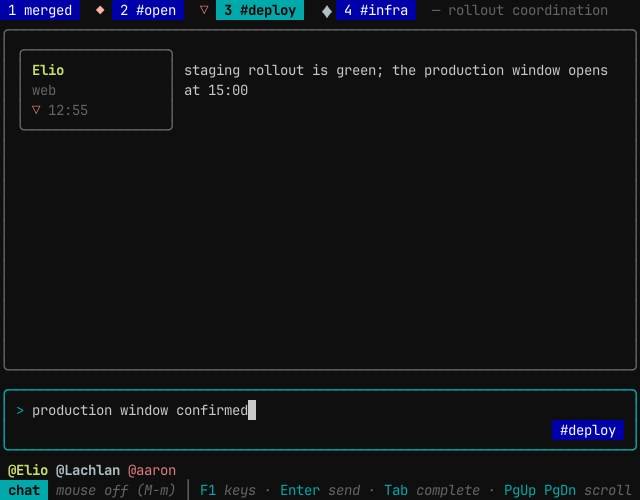
| plain text, on a channel tab | that channel |
#name |
that channel, from any tab |
@Name |
that agent's project tray |
@Name @Other … |
each named agent's tray, one signal per recipient |
/ |
a slash command, never the bus |
The run of leading recipients can mix @ and #. Every recipient is resolved before anything is written, and one bad address rejects the whole line so it can be fixed and sent again. A send to a channel with no live member other than the sender is rejected the same way.
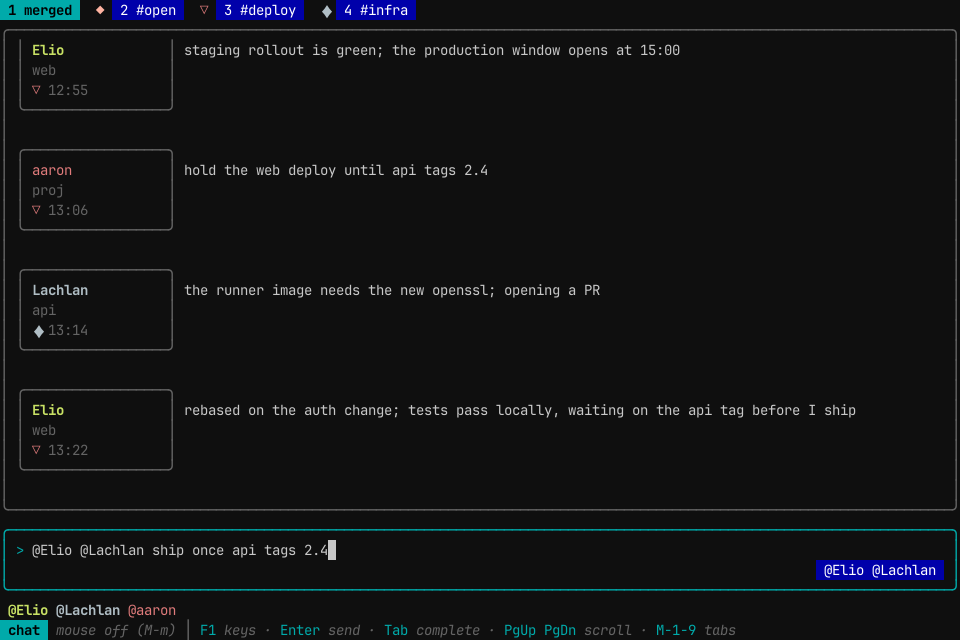
On a channel tab the destination flag shows the channel, so an unaddressed line is visibly scoped before Enter is pressed:
#123 inside a message body is plain text. The receiving agent resolves an issue reference against its own repository.
Slash commands
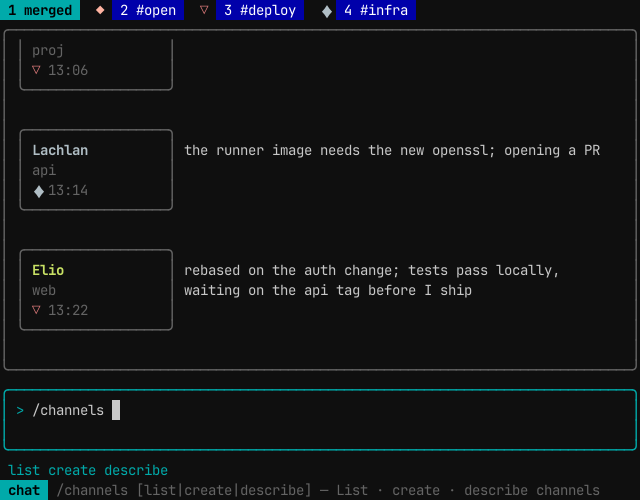
A line that starts with / runs a command. The helper row completes the command name, then each argument, and the bottom bar shows the help for the part being typed. A command that takes no channel acts on the foreground tab's channel.
| Command | What it does |
|---|---|
/help |
list the commands |
/whois @Name |
show a peer's session id and origin directory |
/peers |
list live peer sessions |
/join #name |
join a channel |
/leave [#name] |
leave a channel |
/dissolve [#name] |
remove a channel; refused while it has a live member |
/channels [list] |
list channels with member counts |
/channels create name [description] |
create a channel without joining it |
/channels describe #name [description] |
set a channel's description; empty clears it |
/invite @Name [#name] |
send the peer a message asking it to join; the peer joins itself |
/kick @Name [#name] |
remove a member from a channel and tell it so |
/purge [#name] |
delete a channel's history on disk, keeping the last 90 seconds and any message a live session has not yet read |
/clear |
clear the feed on screen |
#open cannot be joined, left, dissolved, kicked from, invited to or described: every session is already in it. Its history can be purged.
Keys
| Key | Action |
|---|---|
| Enter | send, or run the slash command |
| Shift-Enter, Alt-Enter | new line |
| Tab | on an empty line, the next tab; otherwise complete the @name, #channel or /command being typed |
| Alt-1 … Alt-9 | jump to a tab (1 is merged, 2 is #open) |
| PgUp, PgDn | scroll the feed |
| Left, Right, Home, End | move the cursor |
| Backspace, Delete | edit |
| Alt-m | turn mouse capture on or off |
| F1 | the key help |
| Esc, Ctrl-C | quit |
The mouse is off at start. With capture off, the terminal owns the mouse: dragging selects text to copy, and middle-click pastes into the compose box. Alt-m gives the mouse to the screen. Then a click on a tab shows it, a click on a message selects it and scrolls it fully into view, a click in the compose box places the cursor, a click on a helper chip completes it, and the wheel scrolls the feed. Shift-drag still selects text in most terminals.
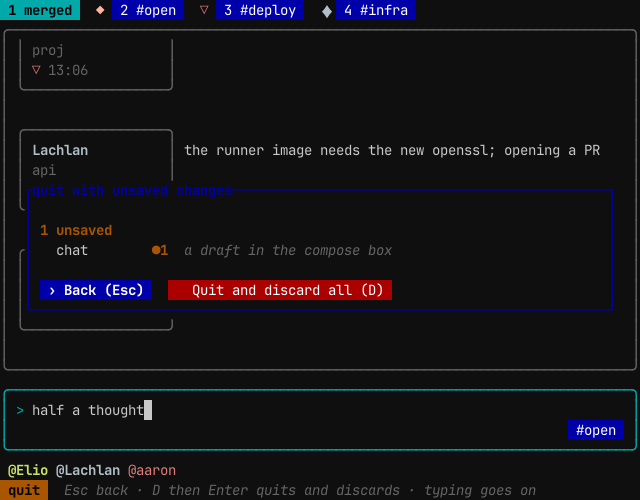
Quitting with a draft. Esc or Ctrl-C quits at once when the compose box is empty. With a draft in it, a prompt names the draft and offers Back (Esc) or Quit and discard all (D). Esc or Enter goes back. D arms the discard; then Enter or Ctrl-C quits and Esc disarms. Characters and editing keys go on typing into the draft, and after an armed D the D is typed too. Other keys, such as Tab or PgUp, leave the prompt as it is.
Colour
The colours come from the agent-ways theme, chosen with ways settings theme. Sender names and channel glyphs keep a fixed categorical palette, so a sender has the same colour in every tab. Colour depth is detected from the terminal; --depth truecolor|256|16|none overrides it, and none draws with attributes only.
Headless frames
--snap WxH prints one frame in agent-tui's text frame format and exits, without a heartbeat. --keys plays keys before the frame: space-separated tokens such as text:hi, enter, tab, esc, alt-3, f1, click:COL,ROW and wheel:up@COL,ROW. A snapshot is a dry run: Enter sends nothing and runs no slash command.
What it does not do
It does not replace the agents' terminals. Editing code and reading long output happen there. It does not start or stop agents, fetch issues, or thread replies; attend reply threads on the wire, and attend-chat shows replies as ordinary messages.
Related
channels.md— channel membership and lifecyclesignals.md— the files attend-chat reads and writesdelivery.md— how a message reaches an agent session../cli/attend.md— theattendCLI reference- ADR-120 — the chat surface, human in the signal loop
- ADR-173 — the chat idiom across the attend command surfaces
- ADR-504 — one TUI engine and one theme